.png?width=49&height=50&name=manifest-icon_black-1%20(2).png)
Overview
This release expands where and how you can use the Companion, improves navigation and layout on mobile devices, and gives new owners and managers a guided introduction to their workspace.
How it works
Dedicated Companion sidebar
The Manifest Companion is now available throughout the app. You can ask a question or request help without leaving your current page. Owners and managers can use the Companion to:
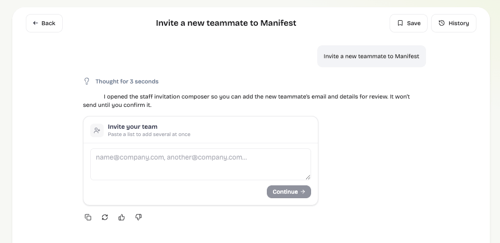
- Invite teammates
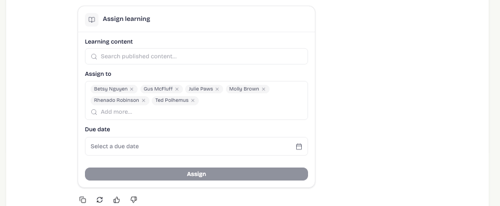
- Assign courses to one person or a group
- See staff progress and learning hours
- Move directly to the right page in Manifest
Before the Companion makes a change, it shows you what will happen and waits for your approval.
Sample prompts
Below are a few examples you can try to get started:
Invite a new teammate to Manifest
Assign the most popular course to everyone on my staff
Show me each team member's course progress and learning hours this month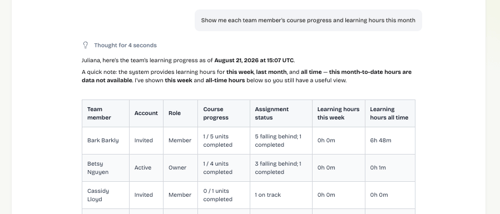
Improved Mobile Experience
Manifest is faster and more consistent on a phone. Page titles remain visible as you move through the app, and a consistent Back button is available for navigation. The Companion is accessible at all times through the new Ask shortcut.
Pages also allocate more space to the information that matters, making it easier to review progress, find training, and complete quick tasks between meetings.
New User Onboarding
New users see a Getting Started checklist based on their role and access. The checklist focuses on unfinished tasks and takes each person directly to the relevant page.
New owners and managers also receive a guided tour of their workspace. The Companion explains each available area, including staff, training, documents, insights, events, and coaching. During the tour, users can invite teammates without leaving the guide. Manifest saves their progress if they stop and return later, and the checklist updates automatically as each task is completed.