.png?width=49&height=50&name=manifest-icon_black-1%20(2).png)
Insights allows you to track monthly financial and operational metrics, visualize trends over time, and receive personalized coaching through the AI Companion integration. Note, Insights is only available to users with Owner permissions by default; users with Manager permission can be granted financial KPI permissions.
How it works
Insights provided comprehensive performance indicator tracking and AI-powered financial analysis. Prior to updating historical data, My Insights will show a No data available until historical data is added to the account.
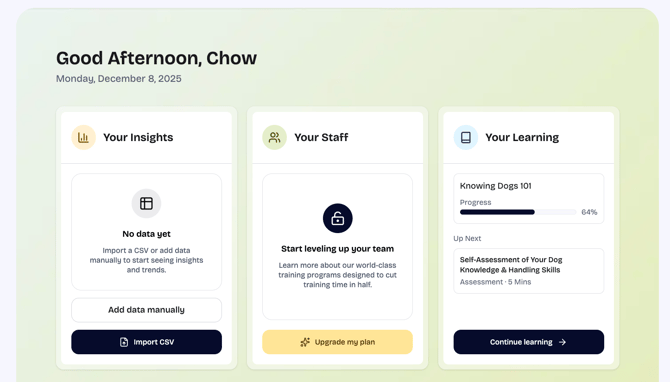
|
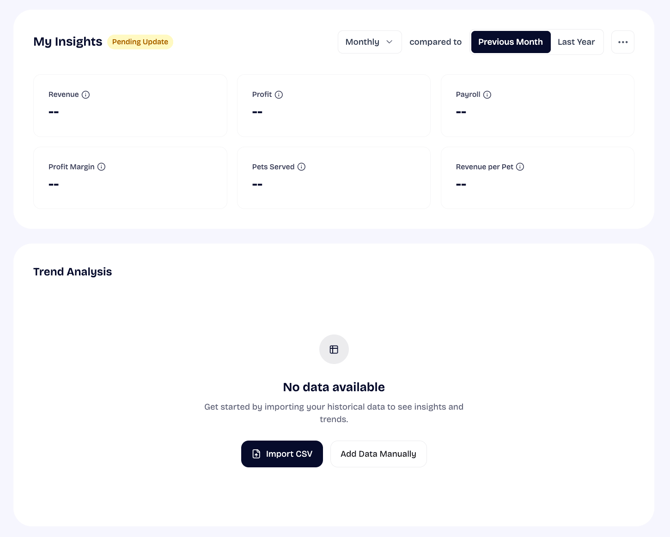 |
To fully unlock insights, users must upload historical financials (data) across multiple months. Below is a list of predefined data that can be uploaded to The Dog Gurus.
| Revenue | Revenue is the total amount of money earned by a company from the sale of goods and services. |
| Payroll | Payroll is a company’s way of paying employees, allowing a business to keep track of payments and taxes throughout the year. Payroll refers to the total amount of money spent on employees spent for a period. |
| Profit | Profit is defined simply as a financial gain – the difference between money earned and money spent. Profit is the amount of money that is left over after all expenses, including taxes and interest, have been removed from the total. It helps determine a company's overall health. |
| Staff size | Staff size is the number of employees on a business's payroll in a given period (includes both part-time and full-time employees). If owner or manager is on payroll, these individuals should be included in staff size count. |
| Pets Served | Pets Served is the unique number of pets in a period regardless of services, length of stay, or number of stays. |
Updating historical insights
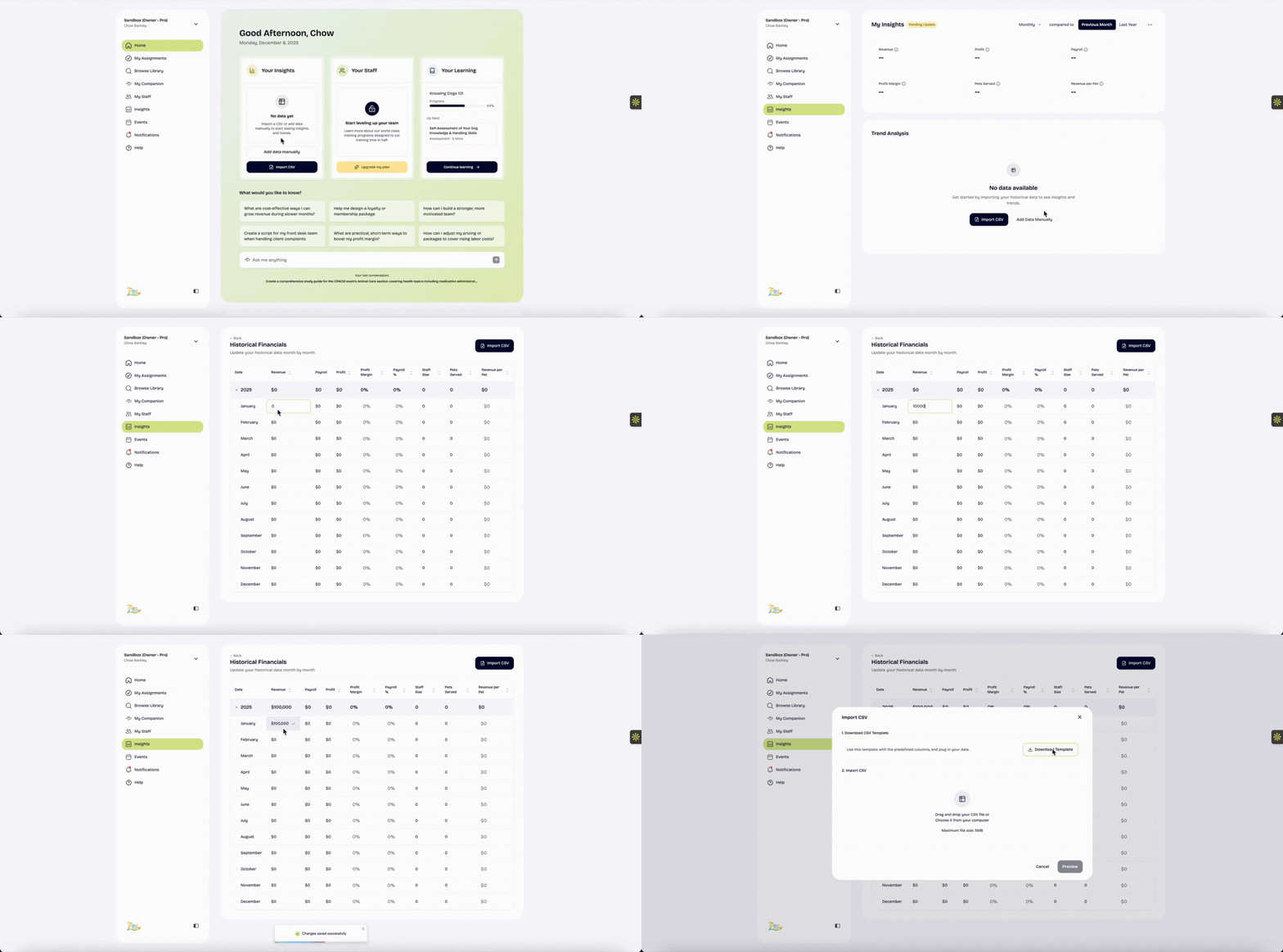
Without historical data, the Insights dashboard shows "No data available" - you need to upload data to activate the feature. For high quality results, we recommend uploading at least 6-12 months of data. You can upload historical data to The Dog Gurus via any of the following options:
- Manual update: Users can add data manually by selecting Add Data Manually to view Historical Financials. You can click into the cell corresponding to any month and specific predefined data point. Manual input will automatically save after you exit the cell.
- Import CSV: Users can download and edit the Download Template to bulk upload data from multiple months.
- Quickbooks integration: The QuickBooks Online (QBO) integration enables businesses to automatically import financial data from their QuickBooks accounts into The Dog Gurus' Insights dashboard. For more details, see the QuickBooks Online integration guide (integration only available on accounts with Pro owner subscription).
Historical financials can be updated via option #1 or #2 via either of the following pages:
- My Insights: https://app.thedoggurus.com/insights/historical
- Settings > Insights: https://app.thedoggurus.com/owner/business/settings?tab=insights
Once you update historical financials, you automatically get KPI visualization and analysis tools with flexible views (monthly, quarterly, annual). The Dog Gurus will automatically calculate your Profit Margin, Payroll %, and Revenue per Pet. Below is a list of how each of these automatically calculated historical data points are calculated.
| Profit Margin | Profit Margin is expressed as a percentage and indicates the percentage of revenue retained as profit after all relevant expenses have been deducted. It is calculated using the Revenue and Profit data provided by business. |
| Payroll % | Payroll % expresses what percent of Revenue is Payroll. This metrics helps a business assess financial health and operational efficiency. It is calculated by dividing Payroll by Revenue. |
| Revenue per Pet | Revenue per Pet is expressed as a ratio between Revenue and Pets Served. It is calculated by dividing Revenue by Pets Served for corresponding period. |
Trend Analysis
Once historical month to month data has been uploaded, My Insights is automatically populated with comprehensive KPI visualization and analysis tools. Within My Insights, you'll unlock intelligent insights and recommendations on how to improve your business performance in addition to visualizing trends over time and comparing performance period-over-period or year-over-year, helping identify patterns and track progress.
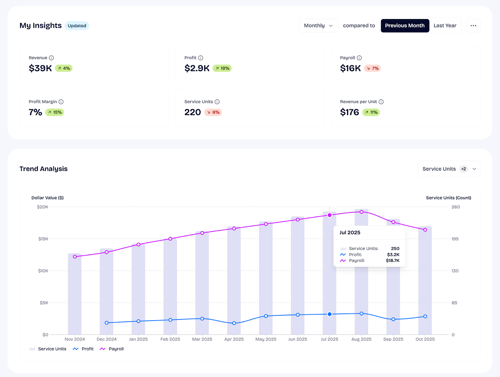
Within My Insights, you can automatically filter and control for the following:
- Period Type Selector: Monthly, Quarterly, or Annual views
- Comparison Type: Compare to previous period or same period last year
- Period Selector: Navigate between specific time periods
AI Companion integration and financial health checks
AI Companion integration
The Dog Gurus' AI Companion can reference your historical performance into your conversations and provide specific, data-driven insights and recommendations based on data you have uploaded. The quality of responses will be dependent on the historical data you have uploaded and specificity of the companion requests. Below are a few examples you can try to get started:
- What is my profit margin trend over the past 6 months? How is my profit trending as a percentage of my total revenue?
- How does my payroll expense compare to industry standards for pet care businesses? Am I spending too much or too little on payroll relative to my revenue, and what specific actions should I take to optimize this metric?
- My revenue dropped last quarter. Can you help me analyze what might have caused this decline? Should I look at whether my Pets Served decreased, if my Revenue per Pet dropped, or if there were other operational factors? What insights can you provide from my historical data?
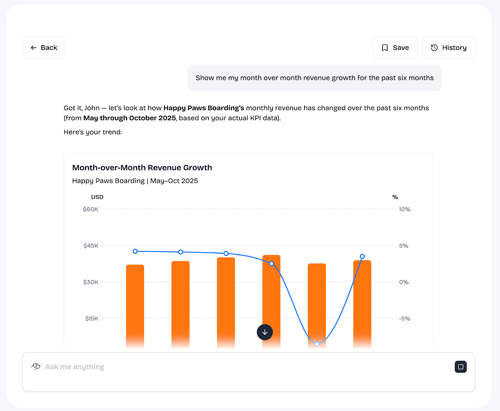
Our AI Companion can also generate visual charts from historical data in real-time during your conversations as would be valuable based on your request.
Financial health checks
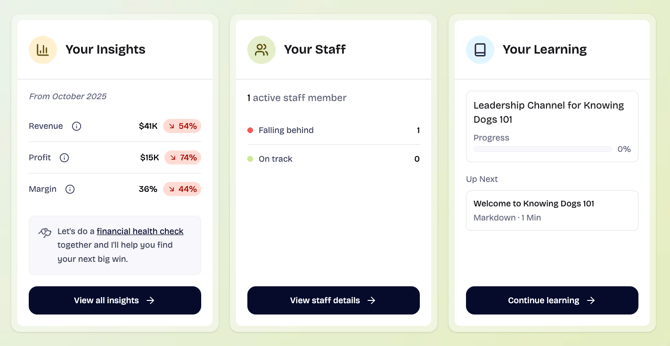
If you have provided sufficient historical data, The Dog Gurus's will automatically suggest a financial health check under Your Insights.
|
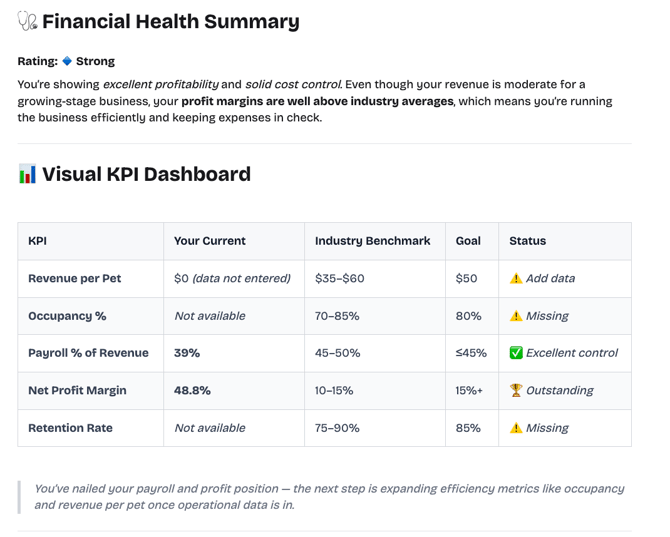 |
The Financial health check utilizes KPIs, benchmarks, and goals to provide you with the following:
- Summary of your financial health
- Visual KPI dashboard: Overview of your current KPIs compared to benchmarks and goals
- Insights on your business: Observations on business performance and early warning signals
- Next big wins: Actionable steps linked to findings
- Motivation: Encouraging note on how to improve and continue momentum